
Seed Installation
Seed by Techysoar
Seed Installation Video
Please follow all the steps to install the seed.
Seed Installation:-
Requirements
Domain and Hosting are necessary to install Seed to your own domain and hosting.
PHP Version: 7.4 (for seed version 1.0.7 or older)
PHP Version: 8.1 (for seed version 1.0.8 and above)
WordPress Version: 6.2 or above
upload_max_filesize: 256M
Domain, Hosting Recommendation:-
Domain Registrar: Godaddy
Best share Hosting: Click here
Best Cloud Hosting: Click here
Assume:-
⇒ I assume you have configured the domain and hosting and have installed
WordPress on it.
Note: if you want to install it on the existing WordPress website then make sure to backup your data otherwise your existing website content will be erased. we recommend installing it on a newly created WordPress website.
These steps should be followed for installing seed:-
Step #01: Log in to your WordPress admin panel and upload, install, and activate
the following plugins from the downloaded Seed file.
⇒ migration-plugin.zip
⇒ migration-plugin-pro.zip
Step #02: Go to the WordPress dashboard menu and Click on the Import link.
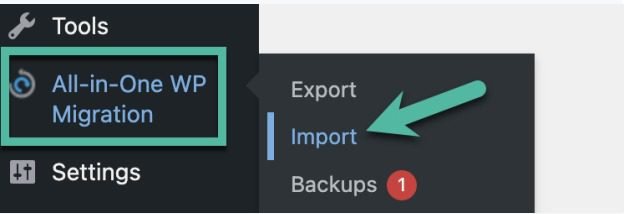
Now you will see a screen like below
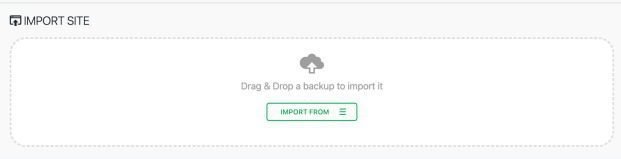
Click on the Green Button and then click on File to upload the Seed.
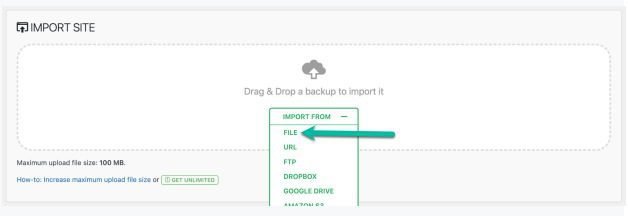
Select or drag and drop the “seed.wpress” file and wait until the uploading process is completed.
After successfully uploading the seed, please create a ticket or send us an email here(support@techysoar.com) to activate your LMS.
After receiving your email or ticket, it will take approximately 24 hours for your LMS to be activated. meantime be relaxed.
Once activated, you need the following login credentials to login for the first time.
After logging in, you must change the password and add a new Super Admin user.
Login Credentials:-
Username: seedadmin@gmail.com
Password: N)DArAswduYo2ZzL5tC@IS92
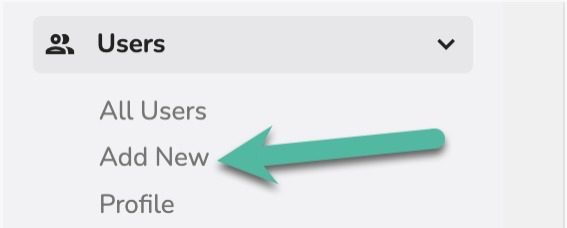
After logging in, first, add yourself as an admin by clicking on Add New.
Installation Services:-
I also offer quality installation services at a low cost if you do not want to bother with the installation process.
Product Installation - ₹ 1,999/-
Use Coupon Code: seedins50 to get 50% OFF
The product installation package includes the following:
- Create a WordPress website on your server.
- Install Seed on that WordPress site.
- Change the logo from the login page and front end.
You must own a server with a control panel like Plesk, cPanel...etc.

We need cPanel access for installation.
